
Facebook’s Update to Timeline for Business Pages
This is an update to my original article below from 2012. Most of the content is still very relative, however since Facebook changes things up (almost monthly it seems!) I felt it best to quickly provide a link to a recent article from Social Media Examiner that covers the latest 2014 update in more detail. Please click the following link for more information…
10 Changes to the Facebook Page Layout: What Marketers Need to Know
And the rest of this is history!
…
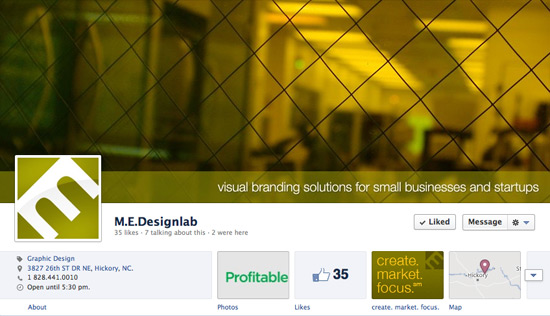
On March 30th, 2012 Facebook is automatically converting all business pages into the new Timeline layout. Not sure if you’re familiar with Timeline, but it basically places a very large image (cover photo) across the top of the page with your icon inset to the bottom left of it. You can go to my Facebook business page to see what I’m talking about. It also has more of a chronological effect, and you can backdate entries to align with your business’ actual timeline.
What happened to my Facebook Welcome Page?
There’s still a place to have a custom page, but this can no longer be the landing page or sometimes referred to as a “welcome page” users come to when visiting your page. I was horrified when I first learned about this because this is one of the key services I offered to my clients when creating visual branding for Facebook Pages. But now that I’ve calmed down a bit, there’s still a need for custom html pages on a business’s Facebook Page and plenty of places to brand a page with images.
There are four “slots” under the cover photo where you can showcase other things—such as a custom page. The Photos slot is always going to be the first one and you can’t rearrange this. However you can swap the order of the others and have these be little clickable ads to other places and pages. On my page, I have the one for “create. market. focus.” which goes to a page with additional information about my company. (This used to be my landing/welcome page for visitors.) So it’s not as powerful as before, but still a good thing to have. I could actually see a lot of my clients having at least one—maybe two custom pages. One for Upcoming Events, and another maybe being a page similar to the welcome page they may or may not currently have explaining their services.
What kind of graphics will I need to make the transition to Timeline?
A definite must is the cover photo! (This is the large image at the top.) There are a bunch of rules regarding the cover photo from Facebook, stating what you can’t put in the photo. You can read more on this page about Timeline Cover Photo Guidelines. The general idea is that the cover photo cannot contain any promotional material such as “click here to go to our web site” or “get your [product] now for only $39.99” and stuff like that. Basically no promotional text, offers, web addresses, etc. However, I have found it okay (or not found any problem with) having a tagline in this picture.
Aside from the cover photo, most businesses will want to revisit their profile pictures. The profile pic used to be able to be as large as 540 pixels tall, meaning you could leverage a lot of the vertical space to the left of the feed. However, now the profile pic must be a perfect square of 180×180 pixels. I also read somewhere that a good test for a profile pic is to make sure it looks good at 32×32, because this is how large it will be beside of posts and comments.
If there are any apps or welcome pages, you’ll need to revisit the image associated with this, because these are no longer square. (These are now located on the right, just below the cover photo.) And there are also images that can be associated with Milestones—a unique way to showcase important happenings in a company’s history.
Cheatsheet of Dimensions for Facebook Timeline Images
- Cover Photos: 851 x 315 (can be larger and dragged around within Facebook)
- App images: 111 x 74 (bigger will also work)
- Profile Pictures: 180 x 180
- Milestones: 843 x 403
Here are couple of helpful links, if you need further information…
Love it or leave it, Timeline is here to stay—for now!
Facebook can be a downer sometimes because they often make seemingly unnecessary changes with little to no notice, and the mandatory conversion of Timeline for business pages is a BIG change! However, I think we will all embrace this change (some kicking and screaming, while others cheering Facebook all the way) and learn to love it in the end.
Do you have an idea for Facebook’s Timeline for your business? Or maybe you need help implementing graphic changes for Timeline? Leave a comment below and I’ll surely get back to you!


Leave a Reply
Want to join the discussion?Feel free to contribute!